To buy Microsoft stocks on eToro, first log in to your eToro trading account or sign up if you're a new user. Then, use the search bar to locate "MSFT", select the correct Microsoft asset, and click on the "Trade" button. Enter your desired investment amount, ensure the leverage is set to X1 for a direct stock purchase, customize your stop-loss and take-profit settings as needed, and then click "Open Trade" to finalize your transaction.
52% of retail investor accounts lose money when trading CFDs with this provider. You should consider whether you can afford to take the high risk of losing your money.
Getting Started with Microsoft Investing
Microsoft, a titan in the tech industry known for its software, cloud computing, and hardware products, stands as a top choice for investors in the online trading world. Unlike buying stocks directly from Microsoft, investing in MSFT shares requires the use of an online broker like eToro. As someone who has navigated this path, I've crafted a guide to streamline your entry into this stock investment.
The Quick Process of Buying MSFT Stocks
Here's how to purchase this tech company's shares on this broker:
Account Registration/Log-In: Sign up via the official website or eToro app if you're a new user. The registration process is straightforward and accommodating. Existing users can simply log in.
Finding Microsoft Stocks: Post-login, search for "Microsoft" or use its ticker symbol "MSFT" in the search bar. Click "Trade" when you see Microsoft in the 'Markets' section.
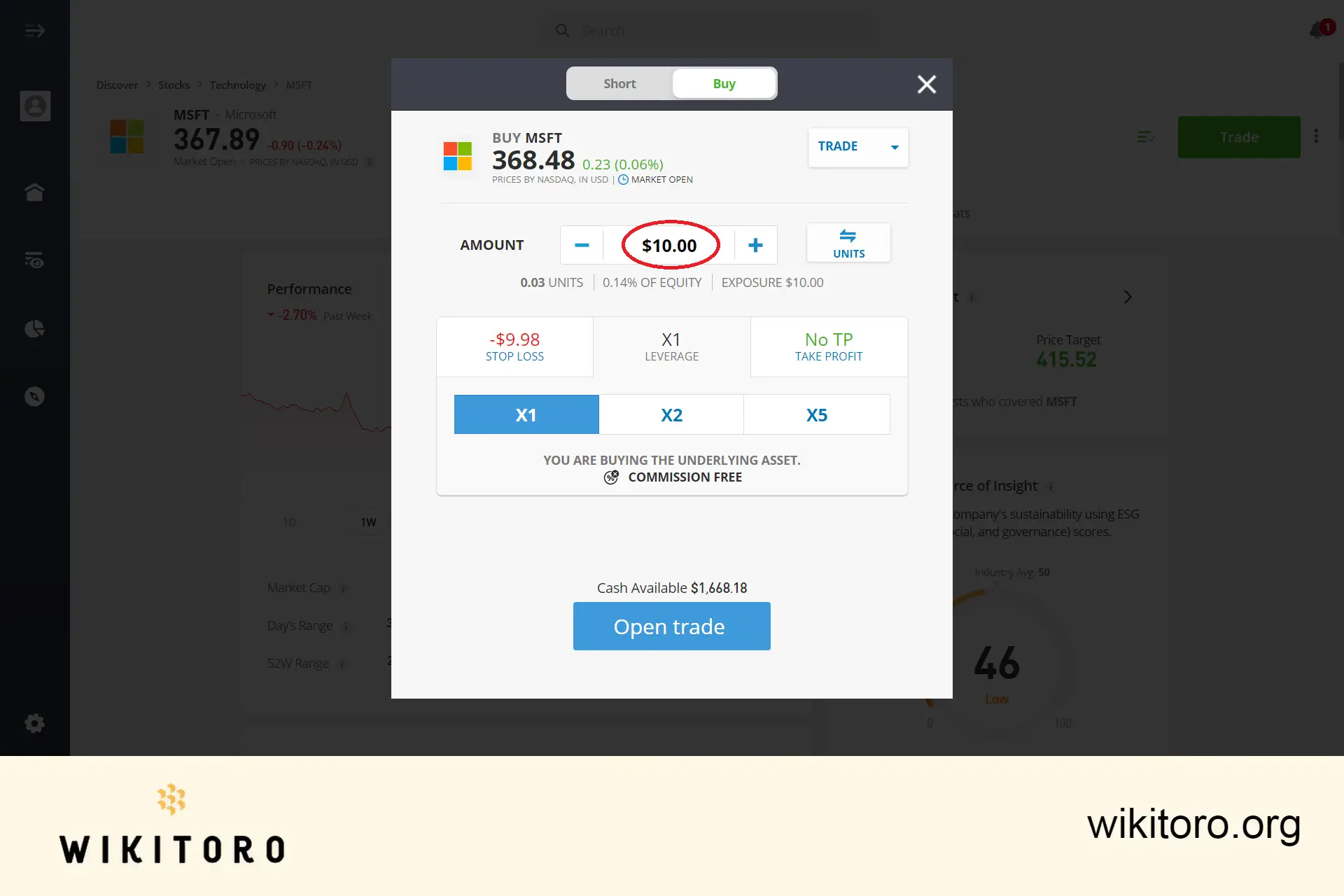
Investment Amount Decision: Choose the amount you wish to invest in Microsoft. Remember, eToro allows a minimum stock purchase of $10, enabling fractional share buying. Entering Microsoft stocks investment amount on eToro
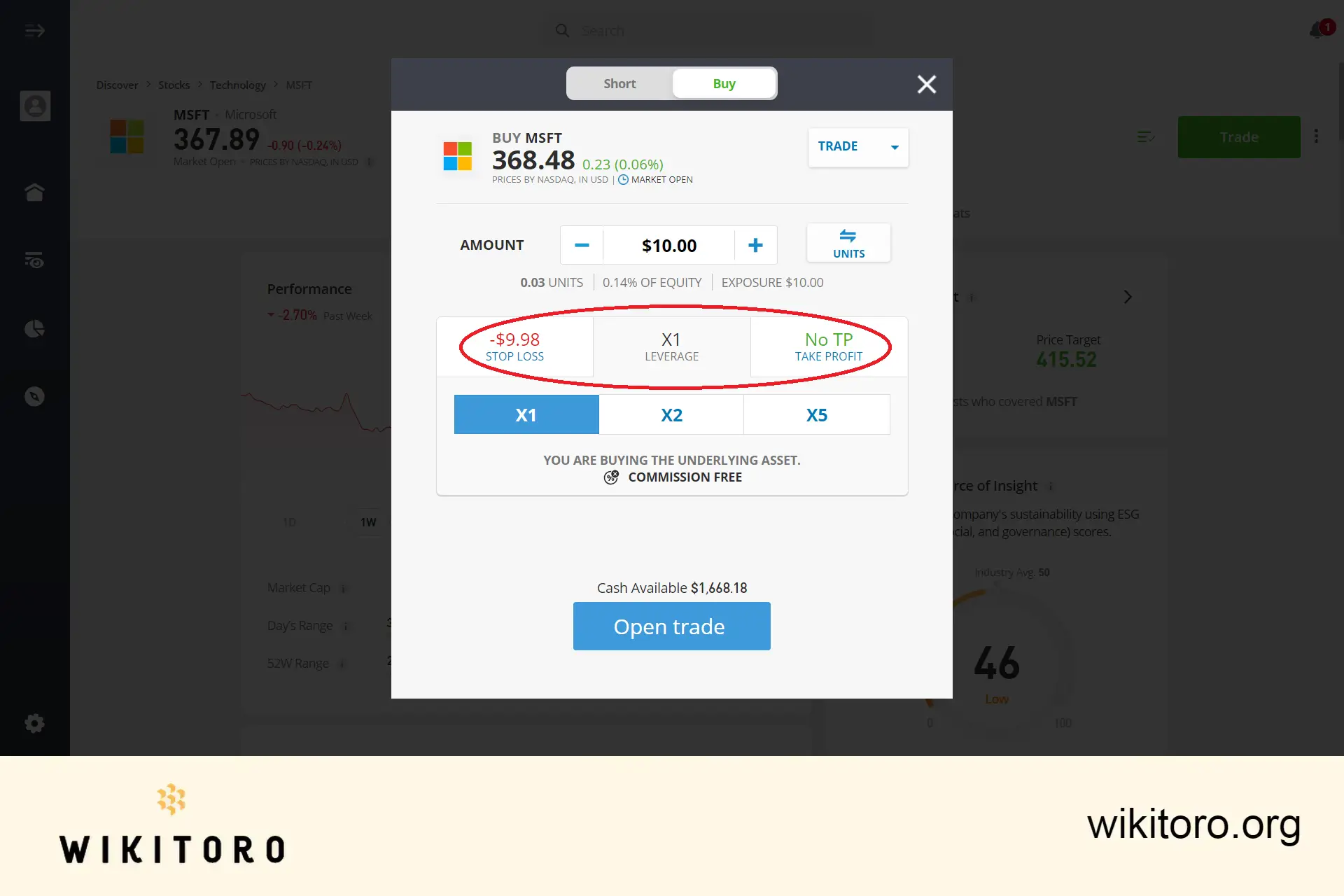
Trade Settings Adjustment: Tailor your trade with eToro leverage, stop-loss, and take-profit settings based on your strategy. Be aware that leverage is associated with stock CFD trading, which may not be available in all regions, including the USA. Setting eToro Microsoft stocks trade parameters
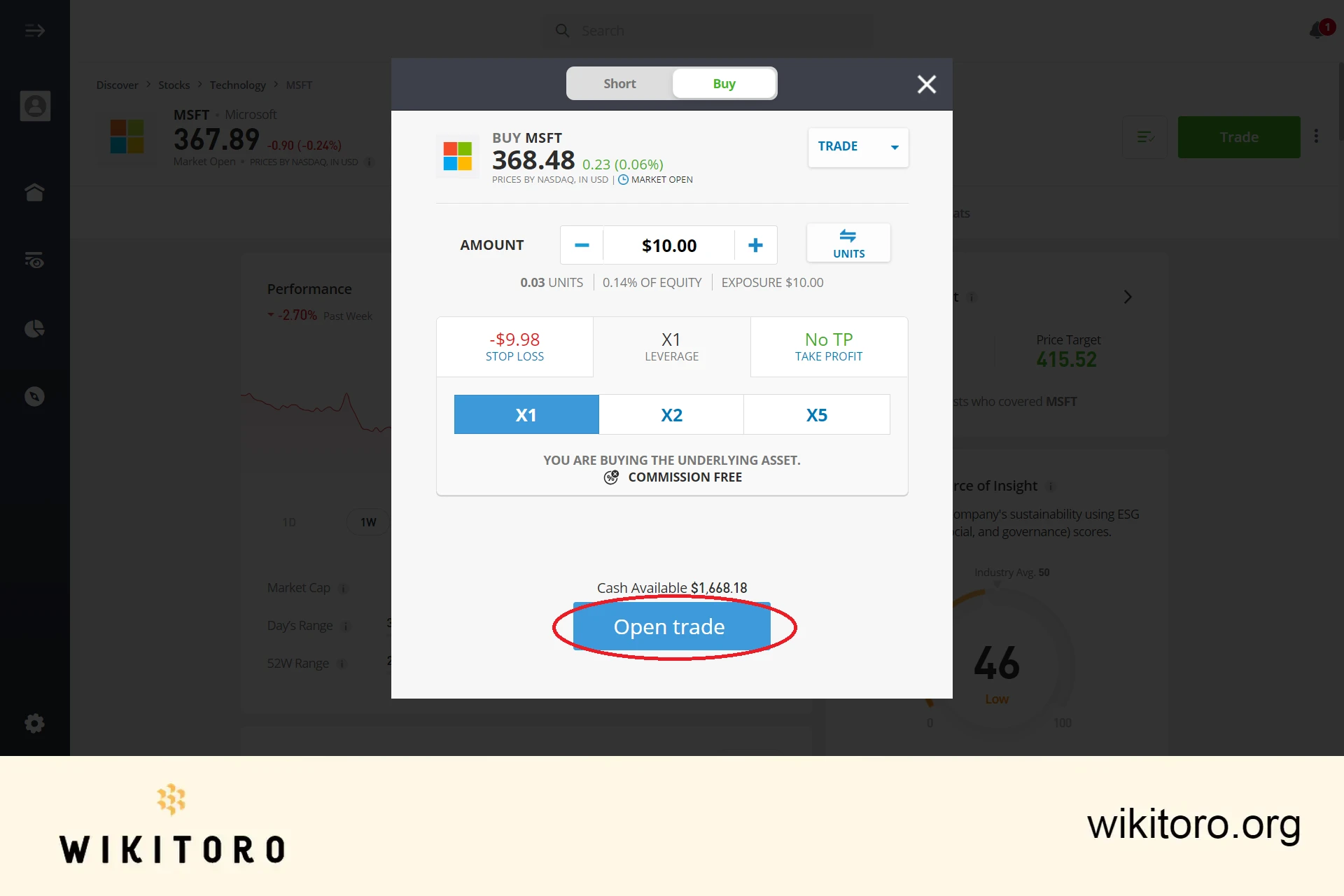
Executing the Trade: Complete your investment by clicking "Open Trade", or opt for "Set Order" if the market is yet to open. Your eToro stock order for MSFT will be placed as the market opens. Executing eToro Microsoft stocks trade
Personal Insights and Key Takeaways
Flexibility of the Platform: I found trading eToro Microsoft stocks to be incredibly flexible. The platform's design facilitates both beginners and experienced traders to navigate and execute trades effortlessly.
Importance of Adequate Capital: Starting with $50, I soon realized the importance of a more substantial initial capital to diversify my portfolio and maximize opportunities. I suggest that you start with a little more capital.
Risk Management: Trading on eToro, or any platform, involves risks. It's crucial to invest with a strategy and an understanding of market dynamics.
Diversification: This broker enables diversification beyond Microsoft stocks. Once comfortable with the platform, exploring other assets can enhance your investment experience.
Continuous Learning: The world of stock trading is ever-evolving. Utilize this broker's available resources and stay informed about market trends and Microsoft's performance for well-rounded investment decisions.
In Essence
Investing in Microsoft stocks on this platform is a blend of strategy, risk management, and ongoing learning. My journey with MSFT via this broker has been enriching, offering insights into both the platform's utility and the broader market.
Whether you're a novice or a seasoned investor, this guide serves as a foundation for informed Microsoft stock trading through this online trading service.
Mike Druttman, Head of Content at Wikitoro.org, has decades of expertise in marketing communications and business matching. Educated at the CAM Foundation and the Chartered Institute of Marketing, Mik...
We use cookies in order to improve the website's performance and enhance your user experience. You may choose your preference to this use of cookies. For more information please refer to our Privacy Policy

 About Mike Druttman











